
 LuckyCharmGold Security Plugin Features
After 1 year of development and continuous optimization, we are proud to announce our custom-built security plugin, a game-changer in the OSRS Services industry. This is, by far, the most advanced plugin in terms of features and security. Please read this page thoroughly to understand how this plugin gives you great confidence in choosing us as your OSRS Services provider.
📸Commands for you as a customer
/screenshot will send a screenshot in the ticket, which everyone can see (including the worker). It will also show the VPN Location of the worker (City + Country).
/screenshotdm will do the same; however, it will be sent to your DM for privacy.
/kickworker: The worker will be immediately kicked off your account. Keep in mind that this is an X-log, meaning that it can take a bit of time before you can log in.
Example of a screenshot request being sent:

🔐Secure account login🔐
All the account data (email, password, bank PIN) that you enter with our Discord bot is encrypted and stored on a server that is only accessible by me, the owner. Since your account data is encrypted, even I am not able to access or see your account credentials in any way.
🧾Secure login for legacy accounts🧾
When asked for in the ticket, you can enter your email, password, and bank PIN (only if necessary for the service). Always provide your bank details if a bank PIN is required, so we can match you to a worker with that amount of a deposit. The worker will be able to access your account via our security plugin without ever knowing any of the information you provided. When the worker logs in to the account, we make sure that the plugin also hides the login email (see the screenshot below).

🚀Secure login for Jagex Launcher accounts🚀
Jagex Launcher account logins will be handled differently. You will be asked to download a custom piece of software that we developed. Instructions to install this software will be sent to you when you need to enter your Jagex Launcher credentials. With our unique custom-designed login method, you will be able to give a worker access to a single character in your Jagex Launcher accounts. There is no way for a worker to access another character than the one you selected, since they don’t know your Jagex Launcher login credentials. Logging in to a single character of your Jagex Launcher account will look like this for the worker.

With this new way of logging in for Jagex Launcher accounts, we also counter the problem of workers who were not able to access the Jagex Launcher via VPN, because the launcher blocked VPN / Proxy usage.
🔑Automatic & secure bank PIN handling🔑
The worker never knows the bank PIN you provide to our Discord bot, and your bank PIN will be automatically entered by our plugin when the worker opens your bank account (without them being able to see what is selected). The way the bank PIN is entered is a very secure form of automation, which will be via key presses. Our developer has been using this on his high-level account for years without any issues. Therefore, we are 100% confident that this slight form of automation is not harmful to your account in any way.
Furthermore, we disabled the ability to change a bank PIN via any bank character.
🏦 First bank screenshot📸
The plugin will automatically send a screenshot of the bank when the worker opens the bank for the first time. Since our plugin only works with RuneLite, this will also show the total bank value. Keep in mind that if your character is wearing valuable items at the time the bank is opened, this will not be reflected in the bank value screenshot.

🌐VPN Location Requirement🌐
When you create a ticket in our Discord server, we ask you which VPN location our worker should use. Always indicate the country as well as the city from which you normally play the account. One of our Staff members will post the job with the VPN country requirement. Our security plugin will then only require our workers to log in via that country; otherwise, they will not be able to access your account! This feature makes sure that the worker doesn’t forget to access your account via VPN.
🛑Automatic VPN kill switch feature🛑
We instruct all our workers to enable the kill switch in their VPN settings. Meaning that if there is a power outage or internet disconnection on their end, they will not leak their real IP to Jagex during the disconnection.
However, we wanted to do even better. In our security plugin, we have a built-in VPN kill switch feature. In the super rare case where a worker doesn’t have the kill switch enabled in their VPN settings, and their connection drops, the security plugin will automatically X-log your account before a connection can be re-established. Meaning that Jagex will never be able to detect an IP switch in the case of disconnection. This gives you full confidence that your account is always accessed with a VPN from the country you indicated.
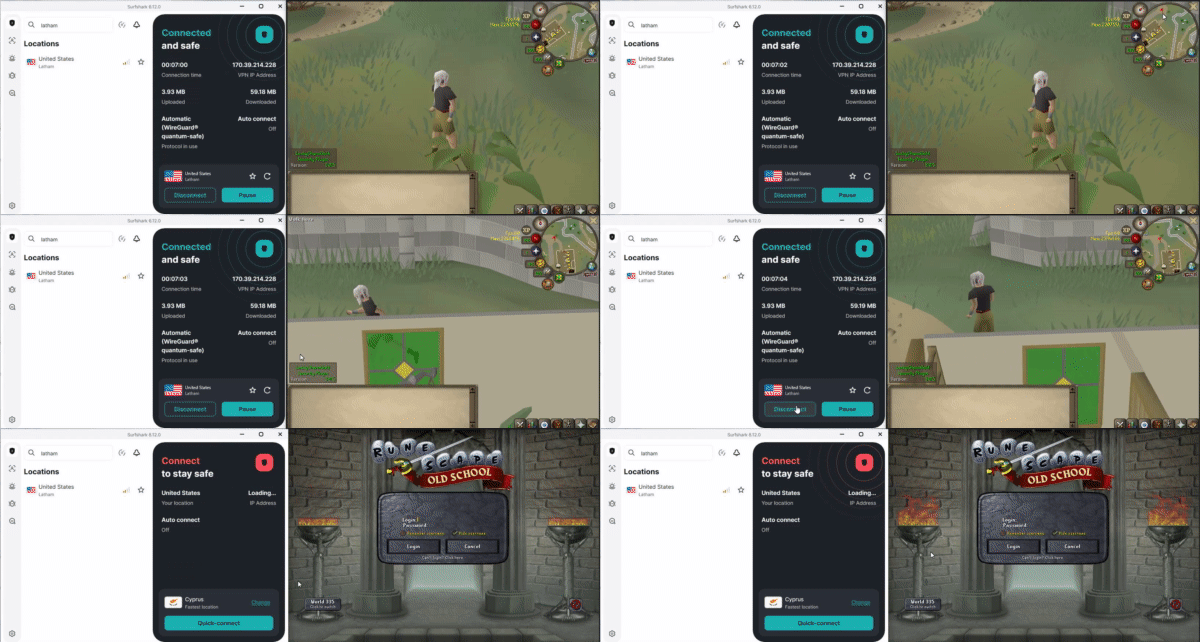
As you can see, the plugin immediately shuts down RuneLite before being able to re-establish the connection and leak my own IP address.
🔄Trade tracking with other players🔄
All trades that are done with other players are tracked with a screenshot in the ticket. Meaning that you will always know when a trade has been made to another player. This way, you are sure that a worker doesn’t transfer any wealth from your account. Outgoing/Ingoing trades are also shown when the ticket is completed, which you can find in the audit log (more about the audit log in the last section).
 Hopping to PvP worlds
Since hopping to PvP worlds is not necessary for any of our services, we will send a screenshot to the Discord ticket if this happens. That way, you are always aware that a world hop took place to a PvP world.
 Regular Deaths
Regular deaths are always screenshotted in the ticket. This way, you are aware of what activity caused the worker to die, minigame deaths included.
With regular deaths, there are normally no items lost. Hence, we don’t have a report of regular deaths in the audit log. However, in the case a worker is chinning on your account, and dies with chinchompa’s, the value lost in chinchompa’s will be shown in the screenshot as well as the audit log.

PvP Deaths
PvP Deaths are very important since this makes it possible to lose wealth or transfer wealth to another account. Therefore, when a PvP death occurs, there is a screenshot sent in the ticket with all the items lost and their total value.
At the end of the ticket, we will send an audit log with all the events that happened, where PvP deaths with the items lost, and their total value will also be included, so you can see how much the worker lost in wealth due to PvP deaths.
❌Disabling all other money transfer possibilities
We wanted to make sure that we disabled all the other wealth transfer possibilities that are not needed when completing any service. We are already tracking PvP deaths and trades done with other players, but there are other ways to transfer the wealth of an account. Likewise, we made sure to disable these features with our plugin.
The following features are disabled with our plugin:
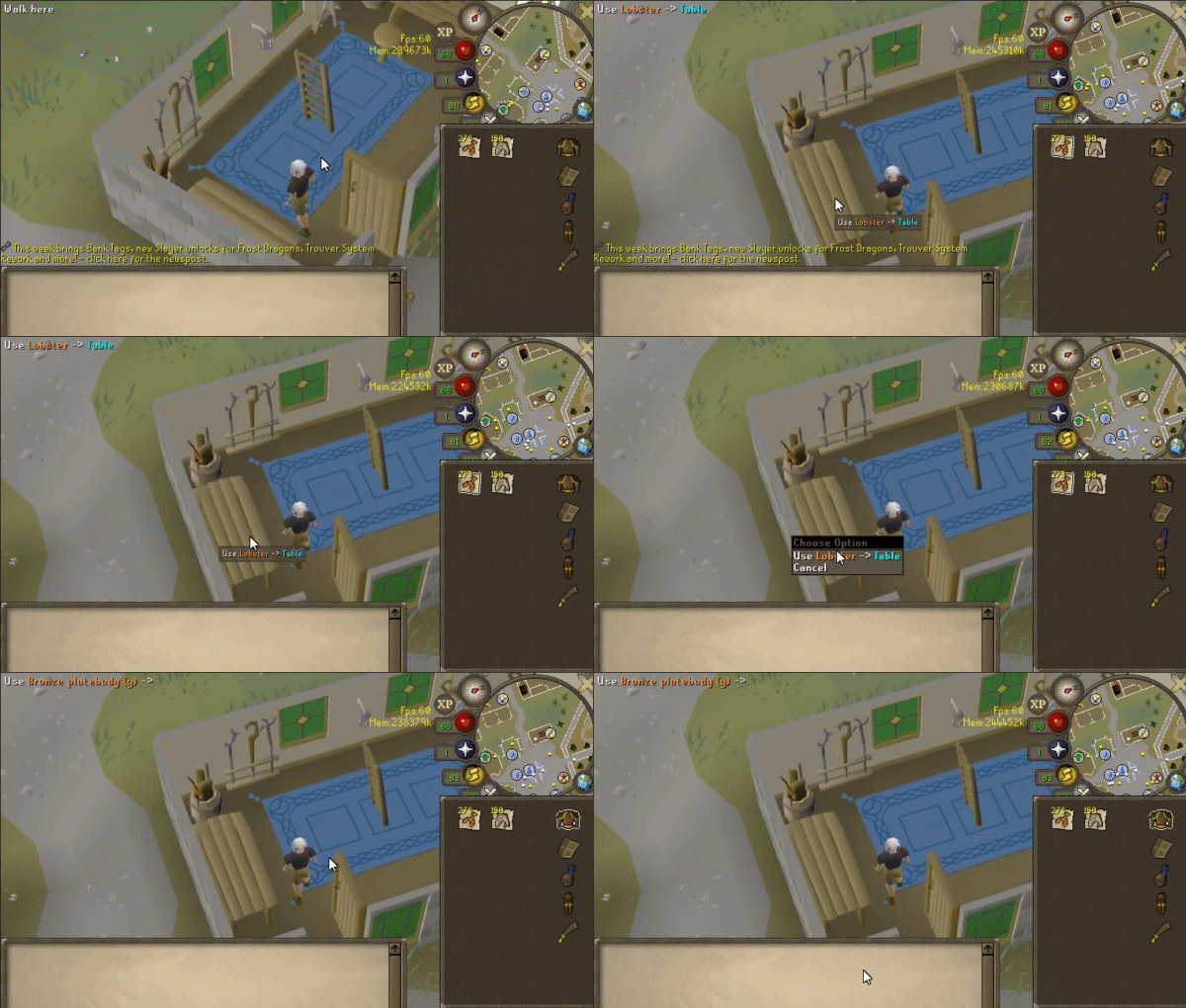
- Workers are not able to use an item on a table (this is similar to dropping). However, for some quests, an item needs to be placed on a table. We made sure to make an exception for these specific quest items.
- Workers are not able to use a tip jar in the player-owned house environment.
- Workers are not able to deposit any items in the Falador Party Room
See here as an example, it is not possible to click any item on a table:
 Automatic screenshots with skills & quests
Every time the worker completes a quest or gains a new skill level, a screenshot will be sent to your ticket. This way, you are always up-to-date with the progress that happens on your account.

 Disallowing other external RuneLite plugins
Our developer made sure that our security plugin is only functional when there are no other external RuneLite plugins being installed. Only the built-in plugins by RuneLite are allowed. This way, you, as a customer, are guaranteed that no illegal third-party RuneLite plugins are being used on your account.
🟢Online/Offline status of your account🔴
-
The following button will display on Discord when your worker is online and active on your account
-
The following button will display on Discord when the worker is offline and not active on your account.
The online/offline status button sometimes has a delay of a maximum of 10 minutes. This is because Discord rate-limits channel statuses. Sometimes the worker might be online/offline while the button is still showing red/green. It will automatically update after a few minutes.
📈Grand-Exchange Buys/Sells📉
All the Grand-Exchange buys/sells that a worker has done on your account will be tracked and will be shown to you in an audit log after the ticket has been completed or cancelled. The audit log will show all the items that were bought/sold, with their quantity, price per unit, and the total price.

🗑️Tracking items dropped🗑️
If any valuable item gets dropped on your account, you will be immediately notified with a screenshot in the Discord ticket, which includes all important untradeable items. This screenshot will also notify you of what item was dropped and the value of the item. All the tracked items that were dropped on your account are also shown in the audit log, which you can see at the end when your ticket has been completed or cancelled.
 Group Ironman storage deposits/withdraws
Any items that are deposited or withdrawn from the storage for group ironman are tracked immediately with a screenshot on the ticket. It will show the item that was deposited/withdrawn on the screenshot. All these deposits and withdrawals are also tracked on the audit log, which you can see when the ticket has been completed or cancelled.
📁Audit Log📁
When your ticket is completed or when your ticket has been cancelled (for whatever reason). An audit log is generated so you can check everything that has happened on your account during the service. The audit log includes the following items.
-
Total time the worker has played on your account.
-
The average number of hours a worker has played on your account per day.
-
VPN locations (city + country) that the worker used to access your account.
-
Grand-Exchange buys.
-
Grande-Exchange sells.
-
PvP deaths (including items lost and total value).
-
Regular deaths (this only shows up in here when a worker died with chinchompa’s).
-
Items dropped (all valuable items dropped, including all untradeable items)
-
Group Ironman storage deposits
-
Group Ironman storage withdraws